
Guide to Understanding Amazon FNSKU Labels: Requirements, Specifications, and Benefits
The FNSKU is a unique identifier used to track inventory in Amazon's fulfillment centers and ensure that each product is credited to the correct seller. The requirements and specifications for the FNSKU label, such as its format and printing guidelines, are explained. The guide also covers the different types of barcodes used by Amazon for FBA products, such as manufacturer barcodes and transparency authenticity codes, and their significance in the delivery process.

With the growth of e-commerce and online shopping, the delivery process has become increasingly complex. The efficiency of Amazon’s delivery system, including fast and free shipping, is what sets it apart from its competitors. To make the process more efficient, Amazon uses barcodes to track inventory in its vast network of warehouses all over the world. In this guide, we will delve into the world of Amazon’s barcode system and its Fulfillment Network Stock Keeping Unit (FNSKU) label, what it is, its requirements, and why it matters.
What is Amazon FNSKU?
FNSKU is Amazon’s internal barcode system used to track products in its fulfillment centers. This unique identifier ensures that each product is correctly credited to the right seller, preventing any confusion or delivery delays. FNSKU is exclusive to Amazon FBA products and is used to monitor the fulfillment status of each product on the platform.
Why Does FNSKU Matter?
While some products may already have a manufacturer’s barcode, using FNSKU is preferred by Amazon as it eliminates the risk of confusion. Using the same barcode, such as UPC, from multiple sellers can lead to mistakes, but with FNSKU, each product is matched with the correct seller. Using FNSKU also simplifies the monitoring process for sellers, making it easier to track their product’s fulfillment status on the platform.
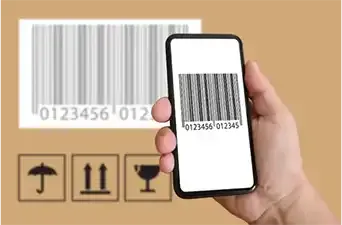
FNSKU Label Requirements and Specifications
Whether Amazon requires FNSKU for a product depends on the product itself. When you list a product on the platform, Amazon will determine whether a FNSKU label is necessary. Products that do not have a scannable barcode, are not in new condition, have an expiration date, or are restricted products may require FNSKU. It is always recommended to use FNSKU for your product, even if it already has a barcode, as it simplifies the monitoring process and eliminates confusion. When selling products through Amazon, it is important to correctly label your items with an Amazon FNSKU label. This label ensures that your items are properly tracked and accounted for in the Amazon fulfillment centers.
Cover All Existing Barcodes
When you send in your inventory, be sure to cover any existing barcodes on each item. This will prevent any confusion or miscommunication during the processing stage.
Elements of the FNSKU Label
- FNSKU number or Registered Unit Barcode
- Name of the product
- The condition of the product (new or other)
- Scannable barcode
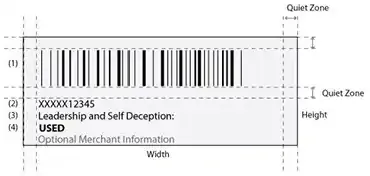
Requirements for Printed Barcodes
- The printed barcodes should match the formatting of the Seller Central generated label.
- The barcodes should have enough white space around the Amazon barcode and related text (0.25 inches on the sides and 0.125 inch on the top and bottom).
- They should also have enough white space around the label content and the edges (0.25 inches on the sides and 0.125 inches on the top and bottom).
- The barcodes should include the ASIN or FNSKU, product name, and item condition.
Amazon FBA Printed Label Requirements
- The printed barcodes should be placed in the correct location on the packaging.
- The correct barcode should be placed on each item and all other visible barcodes should be covered, except for serial number barcodes or Transparency authentication code labels.
- The barcode should be scannable after applying any prep materials and should not be placed on a curved or corner of the package.
- There should be 0.25 inches of space between the edge of the label and the edge of the packaging.
- Each item in a case pack should have a barcode and any barcodes on the case should be removed.
Barcode Specifications
- Format: Code 128A
- Height: Greater than 0.25” (6.3 mm), or 15% of the barcode length.
- Narrow barcode element: Depends on printer resolution (13.33 mils for 300 dpi, 20 mils for 200 dpi)
- Wide-to-narrow element ratio: 3:1
- Quiet zone (sides): Greater than 0.25” (6.4 mm)
- Quiet zone (top and bottom): Greater than 0.125” (3.2 mm)
Barcode Printing Guidelines
- Thermal printers or laser printers are recommended for printing Amazon barcodes. Inkjet printers should not be used.
- The labels should be readable and scannable for 24 months.
- The Amazon barcodes should be tested by scanning them to ensure they work.
- The printer should have a print resolution of 300 dots per inch or greater.
- The printer heads should be tested, cleaned, and replaced periodically.
Label Paper Requirements
- The barcodes should be printed in black ink on white, non-reflective labels with removable adhesive.
- The dimensions of the labels should be between 1 x 2 inches and 2 x 3 inches (1 x 3 inches or 2 x 2 inches, for example).
Types of Barcodes Used by Amazon for FBA Products
Amazon uses three types of barcodes to identify and track products in its fulfillment centers — manufacturer barcodes (UPC, EAN, JAN, and ISBN), Amazon barcodes (FNSKU), and transparency authenticity codes. Manufacturer barcodes are used to track inventory, while FNSKU is used for products that do not have a manufacturer’s barcode. Transparency authenticity codes are used by brand owners to prevent counterfeits.
How to Get FNSKU from Amazon
To get FNSKU for your product, you need to list your product on Amazon and specify your barcode preference. If Amazon requires FNSKU, they will provide you with a unique FNSKU label to be added to your product’s shipping label. It is important to follow Amazon’s guidelines and requirements for labeling to ensure the accuracy of the fulfillment process.
To print a FNSKU label, follow these steps:
- Go to “Manage FBA Inventory” on Amazon
- Choose the product you want to label and click the drop-down menu to the right of it
- Select “Print Item Labels”
- Choose “Print Labels” and click “Ok”
- Select the appropriate label size and print
- Label the FNSKUs on your products according to Amazon’s guidelines for labeling
On Amazon’s Seller Central pages, via downloading Label Resizer extension, you can also see Label Resizer buttons located next to Amazon’s “Print Item Labels” button. By using the Resize Labels button, you can create highly customizable FNSKU labels that meet all of your needs.
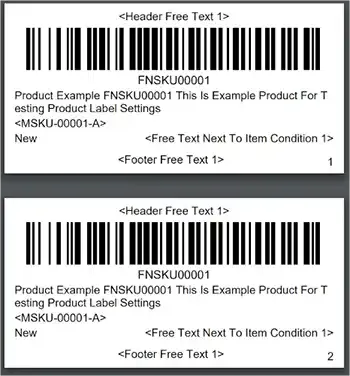
Label Resizer is a helpful tool for creating the perfect label that meets Amazon’s requirements and ensures that your product is processed quickly and accurately. It can be used both as a web uploader and as an extension. The Label Resizer offers a wide range of features, including the ability to add free text, item numbers, separator labels, merchant SKUs, and complete titles to your labels. It also offers a 14-day free trial, with no credit card required.
Label Resizer has also a free FNSKU label maker, making it a great option for those who need to create labels quickly and easily.
Conclusion
In conclusion, using Amazon’s FNSKU system for tracking your products in its fulfillment centers is highly recommended for sellers. It simplifies the monitoring process, eliminates the risk of confusion, and ensures that each product is credited to the correct seller. The FNSKU label should be placed on each product according to the requirements and specifications outlined by Amazon, including the use of the correct barcode format, the proper label size, and the placement of the label on the product’s packaging. When printing the FNSKU label, make sure to use a thermal or laser printer with a print resolution of 300 dots per inch or greater, and to test the barcode to ensure that it is scannable. Additionally, cover any existing barcodes on the product and make sure to place the FNSKU label in the correct location on the packaging. In summary, following Amazon’s guidelines for FNSKU labeling can help ensure that your products are efficiently tracked and accounted for in the Amazon fulfillment network.