
Complying with Amazon FBA Shipping Label Requirements and Specifications
Learn about the requirements for Amazon FBA shipping labels. This article provides a step-by-step comprehensive guide on Amazon FBA shipping label requirements and specifications and also for printing shipping labels on Amazon Seller central pages.

Amazon FBA has been a popular choice among sellers for a long time. The program provides a seamless supply chain solution that takes care of storage, picking, packing, and shipping of items on behalf of merchants. However, many brands still struggle with understanding the rules of FBA, especially when it comes to Amazon’s shipping label requirements. In this article, we will provide you with a comprehensive guide on how to comply with Amazon’s shipping label requirements and ensure fast and efficient deliveries.
Amazon Shipping Label: An Overview
Before diving into the requirements, let’s briefly discuss what an Amazon shipping label is. FBA sellers have three shipping modes to choose from: Small Parcel Delivery (SPD), Less Than Truckload (LTL), or Full Truckload (FTL). Regardless of the shipping mode, all boxes and pallets must include an Amazon FBA label, which is what helps Amazon keep track of your inventory. The shipping label is crucial for the warehouse to manage your inventory, including collection, storage, shipment, and distribution.
Amazon Shipping Label Requirements
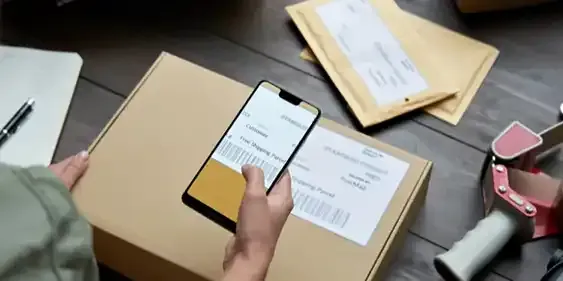
Amazon is very strict when it comes to checking the ID labels for FBA boxes. Here is a list of the requisites for creating a proper FBA box ID label:
- Size: The standard size for each label is 3 1/3 x 4 inches (8.4 x 10.2 cm). Labels can also be printed in 4 x 6 inches (10.2 x 15.2 cm) if you have a thermal printer.
- Location: Place the label in a flat position, away from the box seams, and in an uncovered space to make scanning easier for the warehouse.
- Carrier data: Include the carrier label along with the FBA box ID label.
- Pallet labels: Your pallets require four ID labels, which should be placed in the top middle of each side before shipment.
When printing Amazon shipping labels, keep the following considerations in mind:
- Print each label separately: FBA labels are unique to each package, so avoid reusing a single label for several boxes.
- Printing: Shipping labels should be readable and scannable for up to two years. Set the resolution at 300 dpi and the scaling to 100% to ensure readability.
- Printer options: Amazon optimizes seller documents for thermal printers, but laser printers can also be used. Avoid using inkjet printers.
- Label paper: Print all FBA labels with black ink on white, non-reflective paper and use a font size of 8 to improve readability.
- Font: Use a font that distinguishes the letter “O” from the number “0” and the lowercase “L” from the uppercase “I.”
When using SPD delivery, each box must feature a unique FBA box ID label, and Amazon will return or dismiss any unlabeled package. If you are shipping multiple packages in one large box, you can use only one FBA label, which is the best option for LTL or FTL shipping parcels.
Amazon Shipping Label Specifications
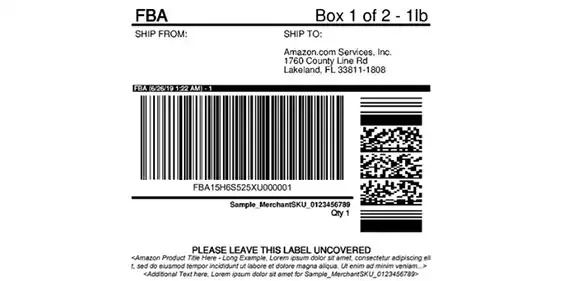
Proper labeling is the key to fast deliveries in Amazon FBA, and labels also store your seller and product data. Therefore, shipping labels ensure that buyers receive the right item from the right brand. Here are the specifications for designing standard FBA box ID labels:
- Ship From: Include the seller’s name and address.
- Ship To: Include the Amazon warehouse address.
- FBA Shipment Identifier: This is a unique identifier that is generated by Amazon and must be placed on each box. This helps the warehouse keep track of your inventory and ensures that your packages are properly stored and delivered.
- Product Information: Include the product name, brand, and number of units. The label must also include a section labeled “Internal Use Only” where the quantity of units or “Assorted SKUs” if the package contains units with different SKUs, is indicated. The “Internal Use Only” section may also indicate if any preparation is required at the fulfillment center, such as “FC Prep Required - LABELING”. A “Seller Use Only” section is optional and can be used to provide seller-specific information.
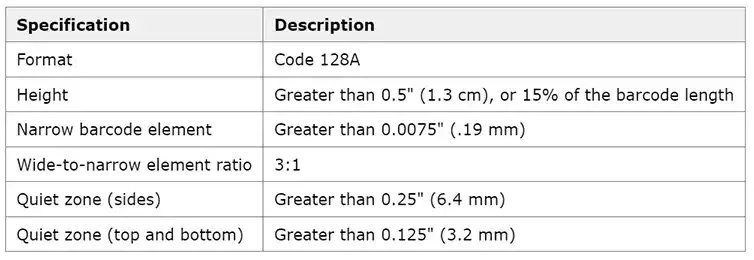
- Barcode: Include a barcode that is unique to each box. This helps Amazon keep track of your inventory and enables them to easily identify and scan each item. The barcode values for each package in the shipment are constructed by starting with the Shipment ID and appending “U” and a 6-digit number to it. The barcode must follow the Code 128A format and meet the height and width requirements.
Creating Shipping Labels on Amazon
Creating a shipping label on Amazon is an easy and straightforward process. You can print your own labels from the comfort of your own home or office, as long as you have a thermal or laser printer and the appropriate paper type. Here is a step-by-step guide to help you get started:
- Log in to Amazon’s Seller Central and navigate to the Inventory tab.
- Click on “Manage FBA Inventory.”
- Choose the shipment or product that you want to print labels for.
- Click on “Edit” and select “Print item labels.”
- Enter the box dimensions (quantity and size), and specify any label preferences you may have.
- Confirm your selection and click “Print labels.”
- Print the labels, making sure to follow the guidelines outlined in Amazon’s Shipping Label Requirements.
As a seller on Amazon’s Seller Central, you have access to the Label Resizer extension. This extension adds a button next to Amazon’s “Print Box Labels” button, allowing you to create shipping labels that are customized to your specific needs.
Label Resizer is a useful tool for ensuring that your shippings are processed quickly and accurately. It can be used as a web uploader or as an extension, and offers a variety of features to help you create the perfect shipping label. These features include the ability to add free text, merchant SKUs, and FBA box ID to your shipping labels. Additionally, Label Resizer offers a 14-day free trial with no credit card required.
In conclusion, following Amazon’s shipping label requirements is crucial to ensure fast and efficient deliveries in FBA. Proper labeling helps Amazon manage your inventory and ensures that buyers receive the right item from the right brand. As a seller, it is important to understand the guidelines and specifications for creating a proper FBA shipping label to avoid any delays or issues with your deliveries.