
Reasons to Use Thermal Printers in Amazon FBA Sales
Learn why thermal printers are a must-have for Amazon FBA sellers - from their durability to reliable, heavy-workload performance. Understand the pros and cons and make the best choice for your FBA business with our informative guide.

Amazon FBA sellers are in need of using distinctive tools to enhance efficiency in their operations. FBA sellers have to deal with every aspect of FBA operations such as monitoring inventory levels, determining their selling portfolio in line with recent demand preferences, and dealing with suppliers to prevent any shortages in product levels. However, the most important aspect in Amazon FBA selling operations is to fulfill customers’ orders in a complete and timely manner to attain customer satisfaction and better reviews. To this end, one of the major components of FBA operations is to attach a proper unique barcode label on each product unit, which can easily be readable and scannable to fulfill the shipment. Therefore, Amazon FBA shipment operations heavily rely on printers, which can be categorized under two most commonly used types: (1) inkjet and (2) thermal printers.
Reliable to Use Inkjet Printers in Amazon FBA?
Inkjet printers simply employ ink to print out documents including images, text, or graphics, and are commonly employed in small offices, homes, and commercial printing firms producing print outs with high quality images. The major superiorities of inkjet printers might be listed as:
- The cost advantage as compared to thermal printers since the inkjet printers and their spare parts are more widely available.
- Inkjet printers produce higher quality images.
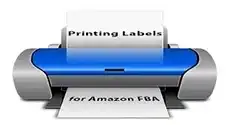
However, inkjet printers have certain drawbacks and disadvantages especially for Amazon FBA sellers:
- Ink-based print outs are more prone to lower image durability due to exposition to sunlight, moisture, and humidity.
- Inkjet printers are more prone to breakdowns due to having more moving components as compared to thermal printers.
- Most importantly, the labels, signs, and barcodes produced by inkjet printers do not have long-term reliability, since they are more prone to tear down.
- In addition to not having long-term reliability and endurance, printing labels and barcodes through inkjet printers can also be time consuming, since you need to cut out labels and tape them on your product and shipping boxes on your own. This method might be especially cumbersome for Amazon FBA sellers with great sales volume since the need for restocking peaks up incredibly.
Superiority of Thermal Printers over Inkjet Counterparts
Thermal printers do not employ liquid ink; instead they use tiny heating components to stimulate pigments on print out paper. Thermal printers are extensively preferred and used to generate markers, alert signs, barcodes, and shipping labels. The widely used type of thermal printer is the direct thermal printer, which employs a thermal print head to darken chemically treated papers through heat. Therefore, thermal printers do not include any input materials and moving spare parts like toner, ink, and cartridges as in inkjet printers. The sole need in using a thermal printer is to buy heat-sensitive labels in line with your size preferences. Here are some major reasons reflecting the comparative advantage of thermal printers over inkjet counterparts:
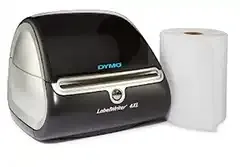
- The print outs generated by thermal printers are more durable in different weather conditions.
- The labels, signs, and barcodes generated by thermal printers are more resistant to extreme storage conditions.
- Thermal printers have very limited moving parts, which gives them a longer lifetime, easier maintenance pattern, and more reliable solutions for heavy workloads.
However, thermal printers have also some limited shortcomings:
- The first complication of using thermal printers might be in the form of cost factor in a way that thermal printers have relatively higher prices. However, recent reductions in thermal printer prices have enabled price levels around fifty dollars depending on trade mark.
- The second drawback is the limited color, wax, and resin choices especially due to the high heat generated by thermal printers.
However, Amazon FBA sellers are in need of printing barcodes and labels in limited color options, mostly in black. Therefore, the above-noted disadvantages of thermal printers might not be regarded as severe shortcomings for Amazon FBA sellers. Amazon strongly urges FBA sellers to put readable and scannable barcodes on their product units to enable storage at Amazon’s facility. Due to the above-noted superiorities of thermal printers, Amazon strongly advises FBA sellers to employ direct thermal printers, which can produce labels and barcodes sustaining a readable and scannable pattern for more than 24 months. Amazon also provides labeling services for FBA sellers and puts labels on products for a fee of $0.20 per item — relatively costly as compared to printing FBA labels on your own.
Most Commonly Used Thermal Printers for Amazon FBA Labels
Amazon FBA sellers with growing sales volume need to employ thermal printers to print their product and shipping labels to maximize working efficiency, prevent shipment errors, and optimize the FBA process. Even if there exist wide options for thermal printer types, the most commonly used and preferred types are (1) Dymo and (2) Zebra desktop thermal printers, which are dedicated to print product and shipment labels with the exact amount of labels you need. Most widely used models are the DYMO LabelWriter 4XL and Zebra GC420d, which are generally preferred by small businesses and larger commercial operations respectively.
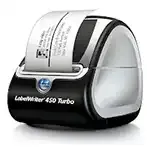
The standard shipping label size is 4” x 6” and thermal labels come on a roll including an average of 250 labels, which can be replaced in your thermal printer in seconds. Furthermore, these labels have adhesive backs, which can be pasted on any surfaces. Thus, you do not have to cut your labels and tape them on your product and shipment boxes. Thermal printers save a lot of your valuable time to be used for other aspects of Amazon FBA sales operations.
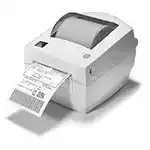
However, Amazon creates labels (product barcodes, shipping labels, and LTL labels) on US letter size and every PDF contains a different amount of labels. As a result, Amazon sellers have to handle these labels manually to print out — such as cropping the PDF file and setting different margins. Label Resizer eliminates this cumbersome process and enables you to customize and print any Amazon FBA labels in seconds.
Label Resizer Prints Customized FBA Labels with Thermal Printer in Seconds
Label Resizer is a tool for Amazon FBA sellers and helps them print any FBA labels directly from Seller Central through their thermal printer. Label Resizer basically resizes any Amazon label (product barcodes, shipping labels, and LTL labels) and makes them fit to your thermal printer label size.
In our solution, you just need to set your label size for your printer. Then, Label Resizer automatically parses the PDF, gets labels, sets the size of the labels and margins. So you can directly print out your labels within seconds. It is very straightforward and easy to use, and it saves a lot of time while preparing your FBA barcode labels.
Label Resizer provides unique features at very affordable prices. To list major services by Label Resizer:
- Works for every type of label like FNSKU barcodes, shipping, product, LTL and box labels and supports all DYMO, Zebra and other label sizes
- Enables full customization for labels such as header, footer, and side text to product labels, informative icons and text attached to labels, colored labels, and the option to print the complete product title on product labels
- Adds new generic and customized labels upon your request
- Option to put item number on each product barcode label to keep track of how many you labeled or how many you put in a box
- Option to put a special separator label between each series of FNSKU, making it easy to see where each product barcode starts and ends
- Has storage add-on to download your archived labels
- Option to put complete Product Title on your labels
Thus, Label Resizer is ready to support Amazon FBA sales and grateful to provide unique services with affordable prices for Amazon FBA sellers.